
Window Cleaning Invoice Template
Download free window cleaning invoice templates for Word & Excel. Create professional invoices in under 60 seconds with pane counts & route billing included.
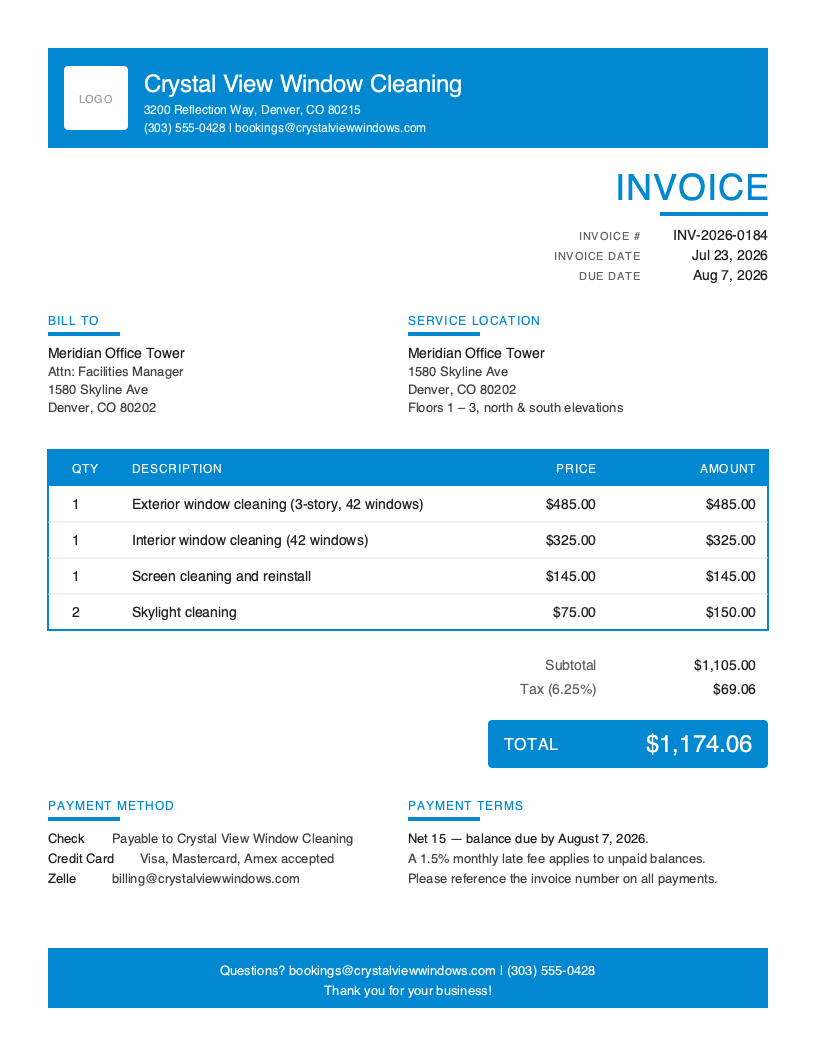
Window Cleaning Invoice Template Variations
Choose from multiple professional designs. Customize colors, add your logo, and make it yours.
Bold
Branded, high-contrast header
No signup required. Create and download instantly.
You just wrapped a three-story residential job. The homeowner is happy, the truck is loaded, and you have two more stops before dark. The last thing you want to do is stop at a coffee shop to type up an invoice on a laptop.
But here is the reality: window cleaners lose thousands each year to vague quotes, forgotten screen upcharges, and invoices that arrive days after the squeegee dried. When you send a professional invoice from the driveway, you collect faster, upsell recurring service, and never explain what “the extra $40” was for.
The window cleaning industry has unique invoicing requirements that generic cleaning templates miss. You need to document pane counts, separate interior from exterior, add screen and track charges, note story surcharges, and clearly show recurring-service pricing — all before the customer closes the door behind you.
What You’ll Find on This Page
- Free downloadable window cleaning invoice templates (Word & Excel)
- Complete breakdown of what every window cleaning invoice must include
- Industry statistics and business insights
- Best practices for faster payments and higher-ticket recurring routes
- How to create invoices in under 60 seconds from your phone
Download Free Window Cleaning Invoice Templates
Choose your preferred format and start invoicing professionally today. All templates include window cleaning-specific fields including interior/exterior separation, pane counts, story surcharges, screen and track add-ons, and recurring service pricing. The Excel version includes built-in formulas for per-pane calculations, story multipliers, and automatic tax calculations.
What to Include on Your Window Cleaning Invoice
A complete window cleaning invoice protects both you and your customer. Unlike a generic housekeeping invoice, window cleaning documentation must include scope-specific line items so customers can see exactly what they paid for and what a repeat visit will cost.
Required Invoice Sections
Invoice Header - Invoice number, date, business logo, and bond/insurance certificate numbers for professional identification.
Business Information - Company name, address, phone, email, and applicable state business license.
Client Information - Customer name, billing address, phone, and email for digital receipts and reminders.
Service Address - Job site address (often different from billing) with any gate codes or access notes.
Line Items - Interior panes, exterior panes, screens, tracks, sills, and any restoration work listed separately.
Pricing Summary - Subtotals for base service, add-ons, and any story surcharges before tax.
Tax Information - Sales tax on cleaning services (varies by state) shown as a separate line item.
Payment Methods - Cash, check, credit card, tap-to-pay, Venmo, Zelle, and ACH for commercial accounts.
Terms & Conditions - Payment due date, satisfaction guarantee, and any streak-free callback window.
Critical Window Cleaning Invoice Elements
Pane and Window Counts - Document the exact pane count on every job. Whether you price per pane, per window, or by square footage, a documented count on the invoice justifies your total and makes the next quote instant. Note storm windows, French panes, and single-hung versus double-hung separately since each takes different labor.
Story Surcharges - Second-story and third-story access adds ladder time, ladder stabilizers, and safety risk. Show story surcharges as their own line items rather than baking them into a flat rate — customers understand the cost when they see it labeled.
Add-On Services - Screens, tracks, sills, hard water restoration, mineral deposit removal, and construction cleanup are all separate line items. Bundling them into “window cleaning” trains customers to expect them free.
Recurring Service Discount - When a customer is on a monthly, quarterly, or semi-annual route, show both the one-time price and the recurring price on the invoice. This visibility is the single biggest driver of recurring signups after the first job.
Understanding Window Cleaning Business Invoicing
The U.S. window cleaning industry generates over $4 billion in annual revenue across residential and commercial segments, with more than 40,000 businesses serving customers nationwide. Barriers to entry are low, but professional invoicing is what separates a side gig from a scalable route business.
Residential Route Cleaners - The largest segment, serving homeowners on quarterly and semi-annual schedules. Residential invoices need to feel simple, look polished, and make the recurring-service upsell obvious. A one-page invoice with clear line items outperforms a two-page spreadsheet every time.
Commercial Storefront Routes - Weekly and bi-weekly storefront cleaners bill monthly against a fixed contract. Invoices need to list each visit date, be easy to reconcile against the customer’s own service log, and support Net 15 or Net 30 terms with automated reminders.
High-Rise and Rope Access Specialists - Commercial high-rise work uses project-based invoicing with detailed scope, insurance/OSHA compliance callouts, and progress-payment schedules. These invoices double as safety documentation and often need to reference the specific COI on file with the property manager.
Window Cleaning Invoicing Best Practices
Send the Invoice Before You Leave the Driveway
The best time to collect payment is while the customer is still admiring the clean glass. Mobile invoicing lets you generate, email, and text the invoice from your phone in under 60 seconds — most residential customers pay on the spot with a card or digital wallet.
Itemize Interior and Exterior Separately
Never combine interior and exterior into a single “window cleaning” line item. Customers routinely choose one or the other seasonally, and separated pricing makes it obvious what a partial service costs. It also turns your invoice into a menu the customer can use to book bigger jobs later.
Document Pane, Story, and Screen Counts on Every Invoice
Record pane count, story count, and screen count in the line item descriptions. This documentation supports your pricing today, prevents “why did it cost more?” callbacks tomorrow, and makes future recurring quotes instant because the details are already on file.
Note Access, Height, and Site Conditions
Photograph locked gates, ladder access, storm windows, hard water staining, or paint overspray before starting. Site conditions justify surcharges, protect you from scope disputes, and give you visual proof of before-and-after quality on every job.
Offer Recurring Route Discounts on the Invoice
Every one-time residential invoice should show the recurring price side-by-side with the one-time price. Monthly, quarterly, and semi-annual customers stabilize cash flow, reduce your acquisition cost per revenue dollar, and are the single biggest lever for scaling a window cleaning business.
Collect Payment Onsite With Multiple Options
Accept tap-to-pay, text-to-pay, credit cards, and digital wallets so customers can settle immediately. The longer you wait, the harder collections get — multiple payment options mean fewer 30-day-old invoices and less time chasing checks.
Include a Streak-Free Guarantee Clause
Add a short “48-hour streak-free guarantee” or “callback within 7 days” clause directly on the invoice. This one line converts hesitant first-time customers, builds trust, and rarely results in a callback because customers know you stand behind the work.
Create Window Cleaning Invoices in Under 60 Seconds
Templates work, but they require manual data entry, calculations, and formatting every time. When you are running back-to-back routes, every minute you spend at a keyboard is a minute you are not on the next job.
Pronto Invoice was built for window cleaners who invoice between houses, not accountants at a desk. Our mobile-first approach means you create professional invoices from your phone in five simple steps:
- Select Client - Choose from saved customers or add new ones in seconds
- Add Line Items - Interior, exterior, screens, and tracks with automatic calculations
- Set Payment Info - Due dates, accepted methods, and recurring schedules
- Add Job Details - Pane counts, story counts, and site notes captured in-line
- Review and Send - Email, text, or print instantly from the driveway
Features Window Cleaners Need
Offline Capability - Residential neighborhoods and rooftop jobs often have poor cell coverage. Pronto Invoice works completely offline — create and save invoices anywhere, and they sync automatically when you reconnect.
Recurring Route Scheduling - Set a customer to monthly, quarterly, or semi-annual and Pronto Invoice generates the next invoice automatically on schedule. Your recurring revenue runs itself.
Photo Attachments - Attach before-and-after photos directly to every invoice. Document site conditions, hard water stains, and finished glass for your records and customer transparency.
Payment Reminders - Automated reminders follow up on unpaid invoices so you can focus on the next job, not collections. Customers can pay directly from the invoice via card or ACH.
QuickBooks Integration - Professional tier includes real-time QuickBooks sync. Invoices flow directly to your accounting software — no double entry, no reconciliation at tax time.
Window Cleaning Invoicing Best Practices
Itemize Interior and Exterior Separately
Break interior and exterior work into distinct line items. Customers often choose one over the other seasonally, and separated pricing makes upsells and repeat bookings simple.
Document Pane and Story Counts
Record pane count, story count, and screen count for every job. This documentation supports your pricing, prevents scope disputes, and makes recurring quotes instant.
Note Access and Site Conditions
Photograph and note ladder access, locked gates, hard water staining, or paint overspray before starting. Site conditions justify surcharges and protect you from callbacks.
Offer Recurring Route Discounts
Show the recurring rate alongside the one-time rate on every invoice. Monthly, quarterly, and semi-annual customers stabilize cash flow — put the savings in front of them.
Collect Payment Onsite When Possible
Residential window cleaning is a cash-flow business. Accept tap-to-pay and text-to-pay so customers settle before you leave the driveway.
Frequently Asked Questions
A complete window cleaning invoice must include: business information (name, address, phone, insurance/bond details), customer details, service address, service date, itemized scope (interior/exterior panes, screens, tracks, sills, storm windows), story count, pricing method (per pane, per window, or flat rate), applicable sales tax, payment terms, and any recurring service schedule.
Window cleaning rates typically use per-pane pricing ($2-$7 per pane), per-window pricing ($5-$15 per window), or square-footage pricing ($0.75-$1.50 per sq ft). Residential jobs average $150-$300, while commercial routes use fixed monthly contracts. Add surcharges for second and third stories, storm windows, screen cleaning, track detailing, and hard water restoration.
Sales tax on cleaning services varies significantly by state. States like Texas, Connecticut, and Ohio tax residential cleaning services, while others exempt them. Commercial cleaning is more commonly taxable than residential. Check your state's Department of Revenue guidelines and always show tax as a separate line item on the invoice.
Related Invoice Templates
Start Creating Professional Window Cleaning Invoices Today
Join thousands of professionals who use Pronto Invoice to get paid faster. Create your first invoice in under 60 seconds.
This guide is for informational purposes only and does not constitute legal or tax advice.